Quote statuses explained
Last updated: September 8, 2026
Answers: What does each status mean? Why am I seeing it? What do I do next for each? Which are final? How long do I wait?
Every carrier responds to your submission with a quote that carries a status. The status tells you what the carrier did and — more importantly — what your next move is.
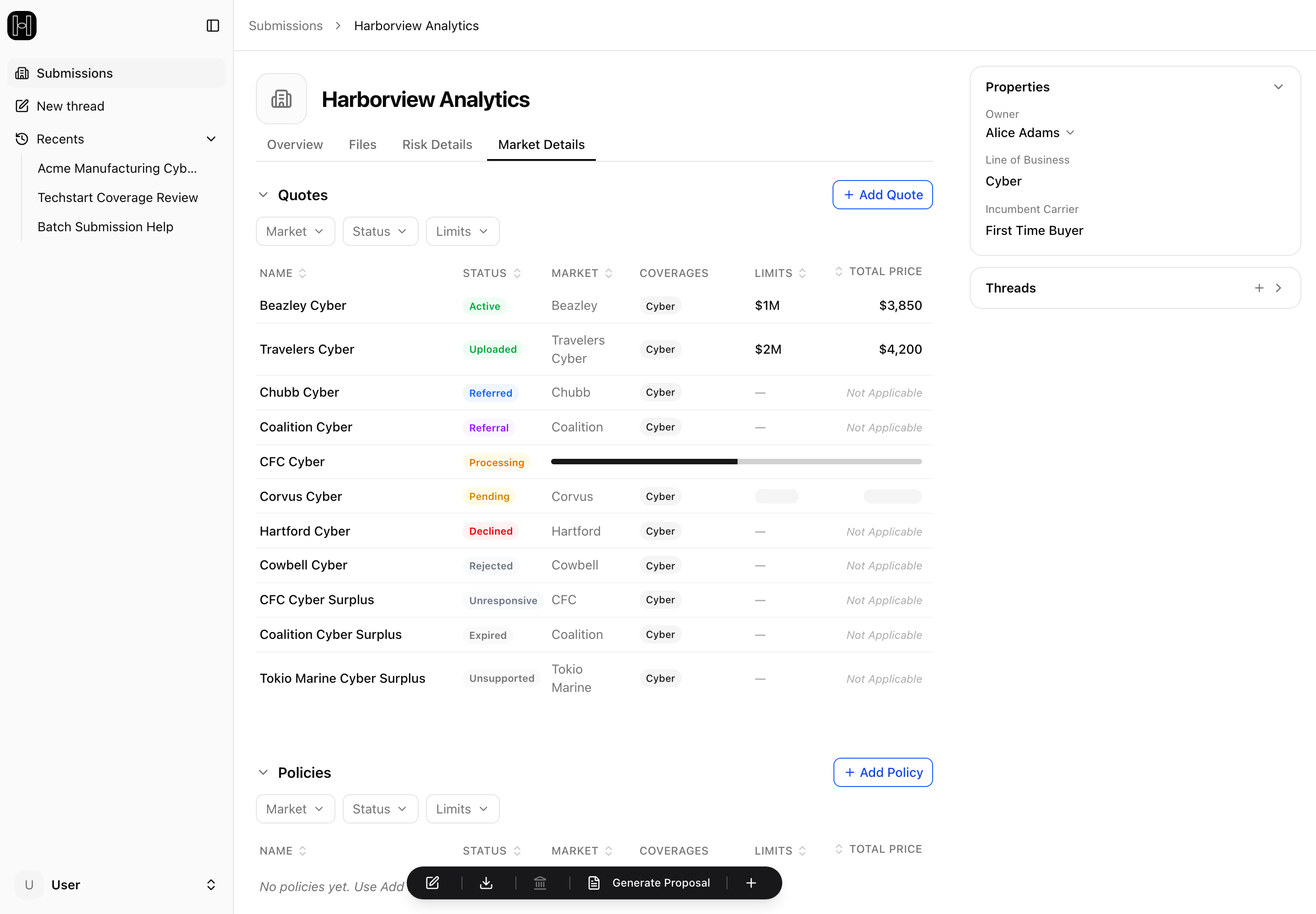
✅ You have a quote
Active
Why you see it: the carrier is offering a quote.
Next step: review the terms, compare, and present to your client. When the client says go, bind through the carrier portal or by emailing the underwriter.
Uploaded
Why you see it: this is a quote you brought in yourself from an offline channel (see Adding offline quotes). It typically represents an active quote from that market.
Next step: treat it like an Active quote — review, compare, present, and bind through that market's usual channel.
🕒 An underwriter is involved
Both of these mean the same thing: the risk needs an underwriter's eyes before you get a quote. That's normal for risks outside auto-quote bounds (higher revenue, certain industries) — it's not an error. The only difference is who starts the conversation.
Referred
Why you see it: the risk needs additional review and has been sent to an underwriter.
Next step: the underwriter will get back to you one of two ways — by email, or by updating the quote directly in the platform. In a rush? Feel free to email them first to keep it moving.
Referral
Why you see it: the risk needs underwriter review, but it isn't on the underwriter's desk until you ask.
Next step: contact the underwriter to request a review and get it in front of them.
Finding the underwriter's contact: open the quote and check its Bind Details tab — when the carrier returns a contact with the quote, it appears there. And you can always reach out to your usual underwriter contact at that carrier instead.
❌ No quote from this carrier
Decline
Why you see it: the carrier has declined to write this risk digitally.
Next step: contact the underwriter for more details, or place the business elsewhere. A digital decline isn't always a final no — for borderline risks, a direct conversation with your underwriter contact sometimes finds a path.
Unsupported
Why you see it: not a decline — the placement system can't quote this risk digitally, usually because the industry code isn't supported for digital quoting by the carrier or the platform.
Next step: contact the underwriter to request a quote offline through your normal channel, and let support@heraldapi.com know — it helps close the gap.
Rejected
Why you see it: the carrier blocked the submission before it could be processed — an authorization or technical error, not an underwriting judgment on the risk.
Next step: contact the underwriter to request a quote offline, and contact support@heraldapi.com so support can look into it.
⚠ Something went wrong in transit
Unresponsive
Why you see it: a technology error — the submission didn't reach the carrier successfully. This is a technical failure, not an answer.
Next step: Herald is alerted automatically when this happens, so there's nothing you need to report. If the placement is time-sensitive, request the quote offline from the underwriter, and contact support@heraldapi.com if it's urgent.
⌛ Lifecycle states
Pending
Why you see it: waiting on the carrier. Fast carriers respond in minutes; others take longer, and anything routed through an underwriter takes days.
Next step: check back shortly for an updated status. If a quote has been pending more than 30 minutes, contact support.
Processing
Why you see it: the quote is in — the platform is extracting the details from its files to build a complete record in the IPS. You'll see it when you upload an offline quote, and when a carrier returns a quote with a quote letter (always for active quotes, sometimes for referred or referral quotes). A progress bar shows how far along it is, and any coverage details the quote didn't arrive with fill in on the Coverage Details tab once extraction finishes.
Next step: give it a few minutes. If it's still processing after 10, contact support.
Expired
Why you see it: the quote is no longer valid — its expiration date passed, an underwriter didn't respond in time, or the carrier expired it when a newer quote replaced it (some carriers allow only one live quote per account).
Next step: re-rate to get fresh terms — see Re-rating in the platform.
If extraction hits an error: an orange warning triangle appears beside the quote's status. On a digital quote the carrier's own details are unaffected; on a quote you uploaded yourself, try the upload again. Either way, contact support if you still need the missing details.
Quick reference
Status | Why you see it | Your next step |
|---|---|---|
Active | Quote is ready | Present to your client, then bind |
Uploaded | Quote you added from an offline channel | Same as Active — present, then bind |
Referred | Needs underwriter review — already on their desk | Underwriter will email you or update the quote in the platform |
Referral | Needs underwriter review — not on their desk yet | Contact the underwriter to request a review |
Decline | Carrier declined to write this risk digitally | Contact the underwriter for details, or place elsewhere |
Unsupported | Platform can't quote this risk digitally | Request a quote offline; tell Herald support |
Rejected | Submission blocked before processing | Request a quote offline; contact Herald support |
Unresponsive | Technology error in transit | Herald is already alerted; go offline or contact support if urgent |
Pending | Waiting on the carrier | Check back shortly; contact support past 30 minutes |
Processing | Extracting quote details from the carrier's files | Give it a few minutes; contact support past 10 |
Expired | Quote is no longer valid | Request a new quote |
Nothing came back active at all?
If every quote is referred, declined, or unsupported, the submission likely sits outside your panel's digital appetite.
Your path forward: bring the risk to market through your offline channels as you normally would. As quotes come back from those markets, upload them into the platform (see Adding offline quotes) — they join the submission alongside everything else, ready to build into a proposal.